Manual: Game Play
The Game Play tab controls gameplay settings for the BHD server. It uses a three-tab layout to organize different types of settings.
Left Side of Game Play Window
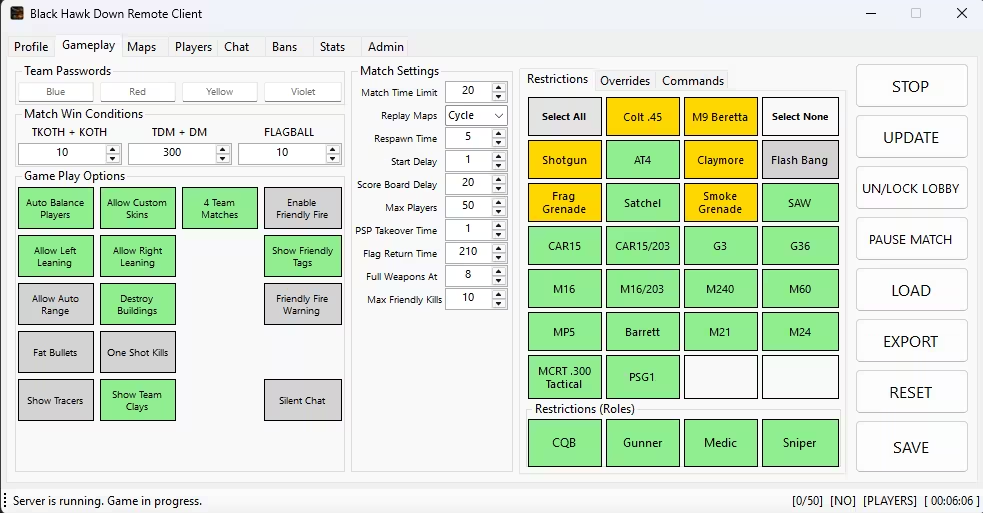
Controls team passwords, server options, and friendly fire.
Team Passwords (Team Pass)
Optional passwords to assign players to specific teams. Supports team assignment bypass of Auto Balance.
| Team | Password Field |
|---|---|
| Blue | Blue password |
| Red | Red password |
| Yellow | Yellow password |
| Violet | Violet password |
Note: Passwords are tested in order: Blue -> Red -> Yellow -> Violet.
Server Options
Toggle buttons enable or disable various gameplay features.
| Option | Description |
|---|---|
| Auto Balance | Automatically balance teams when game starts. |
| Custom Skins | Allow player custom skins. |
| Left Leaning | Allow left lean. |
| Right Leaning | Allow right lean. |
| Auto Range | Auto-adjust weapon range. |
| Map Voting | Enable map voting. |
| Map Skipping | Allow map skipping. |
| Destroy Bldgs | Allow destroying buildings. |
| Fat Bullets | Larger bullet hitboxes. |
| 1-Shot Kills | Enable one-shot kills. |
| Show Tracers | Display bullet tracers. |
| Show Clays | Display team claymores. |
| 4 Teams | Enable 4-team mode. |
| Commands | Enable chat commands. |
| Silent Chat | Enable silent chat. |
Friendly Fire
Team damage settings.
| Setting | Description |
|---|---|
| Enabled | Allow team damage. |
| Max Kills | Friendly-fire kills before auto-kick. |
| Warn | Warn on team kill. |
| Show Tags | Show friendly player names. |
Match Win Conditions
| Mode | Setting |
|---|---|
| KOTH | Score to win. |
| DM | Kills to win. |
| FB | Flags to win. |
Game Settings
| Setting | Description |
|---|---|
| Time Limit | Round time in minutes. |
| Loop Maps | Replay map mode. |
| Start Delay | Start delay in seconds. |
| Respawn Time | Respawn delay in seconds. |
| Scoreboard Delay | Delay before scoreboard in seconds. |
| Max Players | Maximum player slots. |
| PSP Takeover | Time before PSP takeover in seconds. |
| Flag Return | Time before the CTF flag returns in seconds. |
Restrictions Tab
Controls weapon availability, role restrictions, and Knife and Sides mode.
Weapons
A grid of button controls exists for each available weapon. Buttons have three states.
| Button Color | Meaning |
|---|---|
| Gray | Weapon is disabled. |
| Green | Enabled when player count meets threshold. |
| Gold | Always enabled and bypasses threshold checks. |
Controls:
- Left-click: Toggle between Enabled (Green) and Disabled (Gray).
- Right-click: Cycle through Enabled with Override (Gold).
Quick Actions:
- Select All: Enable all weapons.
- Select None: Disable all weapons.
Note: Knife and Med Pack remain enabled regardless of settings.
Knife & Sides Mode
When enabled, this restricts weapons based on player count to encourage close-quarters combat.
| Setting | Description |
|---|---|
| Full Weapons At | Player count threshold. Below this, only Knife, Med Pack, and gold-marked weapons are permitted. |
Role Health Settings
Restricts weapon classes and sets health values per role.
| Role | Health | Description |
|---|---|---|
| CQB | 100-500 | Close-quarters combatant health. |
| Gunner | 100-500 | Automatic weapon user health. |
| Sniper | 100-500 | Long-range weapon user health. |
| Medic | 100-500 | Medic class health. |
Overrides Tab
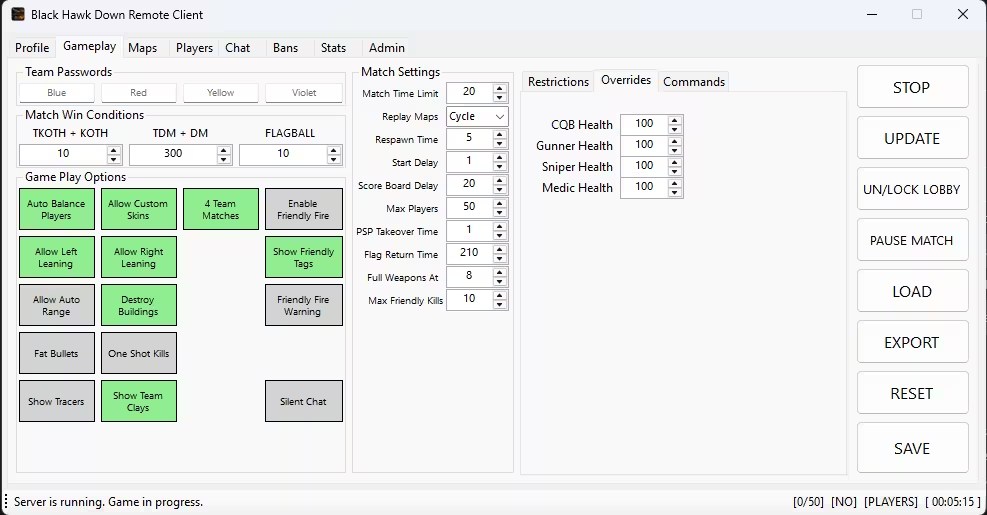
Commands Tab
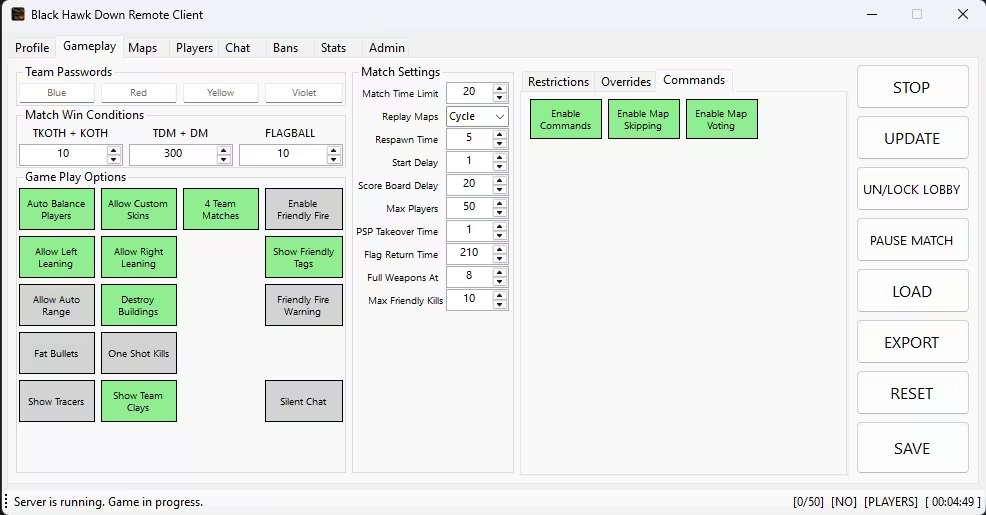
Configuration management and server control.
Settings
| Button | Description |
|---|---|
| SAVE | Save all settings to server. |
| RESET | Reload settings from server and discard changes. |
Import/Export
| Button | Description |
|---|---|
| EXPORT | Save settings to a JSON file. |
| LOAD | Load settings from a JSON file. |
Server Controls
These buttons control server state and only appear when the server is running.
| Button | Description |
|---|---|
| START/STOP | Start or stop the game server. |
| UN/LOCK LOBBY | Block or allow new players. |
| PAUSE/RESUME | Pause or resume the match. |
Note: On Resume, all players die and return to spawn points.
Edit Mode
- 2-minute inactivity timer: After 2 minutes of no changes, the form auto-refreshes and discards unsaved changes.
- SAVE button: Turns orange when in edit mode.